
Installing Casterlabs-Caffeinated
How to Install Casterlabs-Caffeinated.
In order to install Casterlabs-Caffeinated, you will need to download the installer from the Casterlabs website. Once downloaded, run the installer and follow the prompts to complete the installation.
System Requirements #
Casterlabs-Caffeinated will work on Windows 10 and Windows 11.
It is recommended to keep your system up to date with the latest updates from Microsoft.
As of January 2026 Casterlabs-Caffeinated is no longer supported on Windows 10.
If you are running Windows 10, please upgrade to Windows 11 or a supported version of Windows 10.
There is currently no official release of Casterlabs-Caffeinated for macOS.
We are working on a closed-Alpha release for macOS, but development is currently on hiatus.
There is currently no official Linux version of Casterlabs-Caffeinated.
You may be able to run the installer through something like Wine, but at the moment we do not support Linux and cannot guarantee that it will work.
Windows Defender SmartScreen #
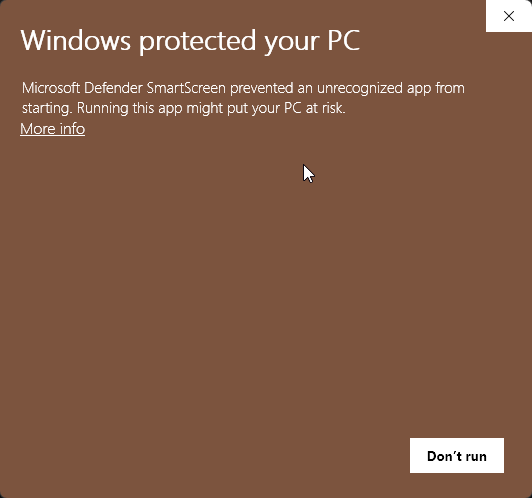
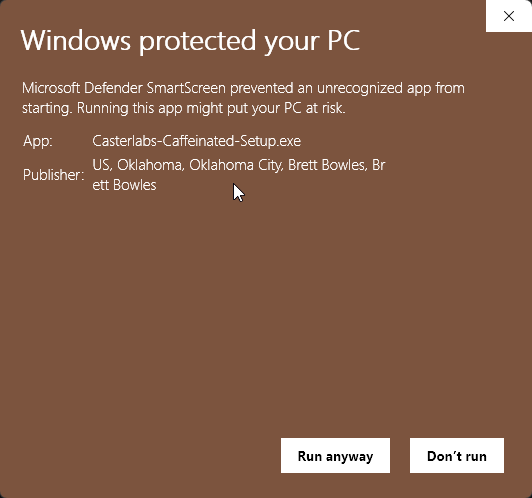
You may find that Microsoft Defender tries to protect you from installing Casterlabs-Caffeinated and opens up the SmartScreen. Clicking on More info will open up all the signing information for the publisher, verifying that the certificate is signed by Casterlabs (As Brett Bowles - the developer) and is safe to install.